
How to Use ConCat
Welcome to our new registration system called ConCat! You can access it at https://reg.rappigcrossing.com
Sign Up for a ConCat Account
- Note that your account will rollover to future convention years, so you only need one account!
- Create an account at https://reg.rappigcrossing.com/register
- Please remember to verify your email address! We can send important announcements via email but only if you have verified your email.
Your Dashboard
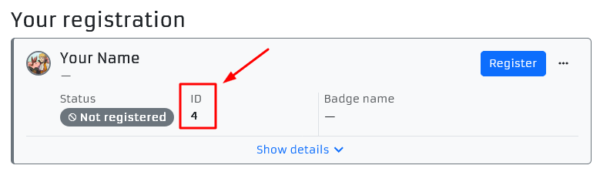
- Once logged in, you will see the main Attendance page. This is where you can buy your badge. Other menu items will allow some other self-service features.
- All product prices include Taxes/Fees!
- Also take note of the “ID” under “Your registration”, this may be used for some applications.
Event Store
- In the sidebar/menu, find the Event Store page.
- If any of these add-ons interest you, you can purchase them now to be available for you when you pick up your badge!
- Note that some items may not available at-con (such as Casino Night tickets).
- All product prices include Taxes/Fees!
- AT-CON:
- During the con, you can also use your account to buy items!
- Raffle tickets, merch, and more will be available for purchase, and you can pay at ConOps with either ConCat, cash, or credit card.
Applications
- In the sidebar/menu, find the Applications heading.
- Some applications will be done directly in ConCat (Volunteering, Artist Alley) and others might be through a Google Form.
- For specific instructions on Artist Alley, go here.
Need Help?
Bought a badge and can no longer attend? Please review our refund policy.
Please don’t hesitate to ask @DeguArts on Discord, or email [email protected] for help.